Create a Survey with ChatGPT: Step-by-Step Guide (2026)
Step-by-step guide: Use ChatGPT to create not just a survey, but an AI-powered survey with automatic follow-up questions. Includes practical examples and templates.

Dr. Andreas Ejupi
AI Research
ChatGPT can create professional surveys in minutes – from question formulation to structuring the entire questionnaire. But there’s more: With the right integration, you’re not just creating a survey faster, you’re creating a survey that works with AI itself – with automatic follow-up questions for vague answers and AI-powered analysis.
This article shows you two approaches: the manual method (ChatGPT generates text, you copy it into a static tool) and the integrated method (ChatGPT creates an AI-powered survey that thinks along during the response process).
Why Use ChatGPT for Surveys?
Traditional survey creation is time-consuming: formulating questions, defining answer options, optimizing sequence, avoiding bias. ChatGPT accelerates this process significantly:
- Fast question generation – Describe your goal, ChatGPT delivers matching questions
- Bias checking – AI identifies suggestive or unclear formulations
- Structure suggestions – Logical sequence and question types are automatically recommended
- Multilingual support – Instant translation for international surveys
Method 1: The Manual Approach (Static Survey)
With the manual method, you use ChatGPT as a text generator and transfer the results to a separate survey tool. The result is a classic, static survey – AI only helps with creation, not execution.
Step 1: Define Goal and Context
Give ChatGPT a clear task with context. The more precise your description, the better the result.
Example prompt:
Create a questionnaire for a customer satisfaction survey.
Target audience: Customers of an online sportswear shop.
Goal: Find out how satisfied customers are with delivery time,
product quality, and customer service.
Scope: 8-10 questions, mix of rating scales and open questions.
Step 2: Generate Questions
ChatGPT delivers a structured questionnaire:
Customer Satisfaction Survey – Sportswear Online Shop
- How satisfied are you overall with your last purchase? (1-5 stars)
- How do you rate the delivery time? (1-5 stars)
- Did the product quality meet your expectations? (Yes / Partially / No)
- What did you particularly like? (Open question)
- What could we improve? (Open question) …
Step 3: Optimize Questions
Ask ChatGPT for improvements:
Check the questions for neutrality and clarity.
Are there any suggestive formulations I should change?
Step 4: Transfer to Survey Tool
Copy the finished questions into your survey tool (Google Forms, SurveyMonkey, Typeform, etc.) and manually configure the answer options.
Drawbacks of the manual method:
- Time-consuming copying and formatting
- Manual configuration of each question
- The result is a static survey – no AI follow-ups, no automatic analysis
Method 2: AI-Powered Surveys Directly from ChatGPT
Here’s the crucial difference: With this method, you’re not just creating a survey with ChatGPT – you’re creating a survey that works with AI itself. The finished survey automatically asks follow-up questions when answers are vague and analyzes results with AI support.
Since 2025, ChatGPT and other AI assistants support the Model Context Protocol (MCP) – a standard that connects AI directly with external tools. This allows ChatGPT to not only formulate surveys but also publish them directly as AI-powered conversational surveys.
How It Works
- Connect ChatGPT with Feedbk – One-time setup in settings
- Describe your survey – “Create a survey about customer satisfaction”
- Adjust questions – ChatGPT helps with optimization
- Publish – One click, and you get a shareable link
Setup in ChatGPT
- Open ChatGPT (Web or Desktop App)
- Go to Settings → Apps & Connectors → Browse Connectors
- Select Add Custom Connector
- Enter:
- Name:
Feedbk Survey - URL:
https://mcp.feedbk.ai/mcp
- Name:
- Save – done
Start Creating a Survey
After setup, you can get started right away:
- Open a new chat in ChatGPT
- Select the Feedbk Survey app at the bottom of the input field (as shown in the video)
- Type e.g.: “Create a survey about customer satisfaction”
ChatGPT will ask you for details (name, questions, question types) and create the survey step by step. At the end, you’ll receive a link to share and a link to the dashboard for analysis.
Benefits of the Integrated Method
| Aspect | Manual | Integrated (MCP) |
|---|---|---|
| Time required | 15-30 min | 2-5 min |
| Formatting | Manual | Automatic |
| Publishing | Separate step | Directly from ChatGPT |
| AI follow-ups | Not possible | Automatically enabled |
| Analysis | Manual | AI-powered |
What Makes These Surveys Different? AI Probing Explained
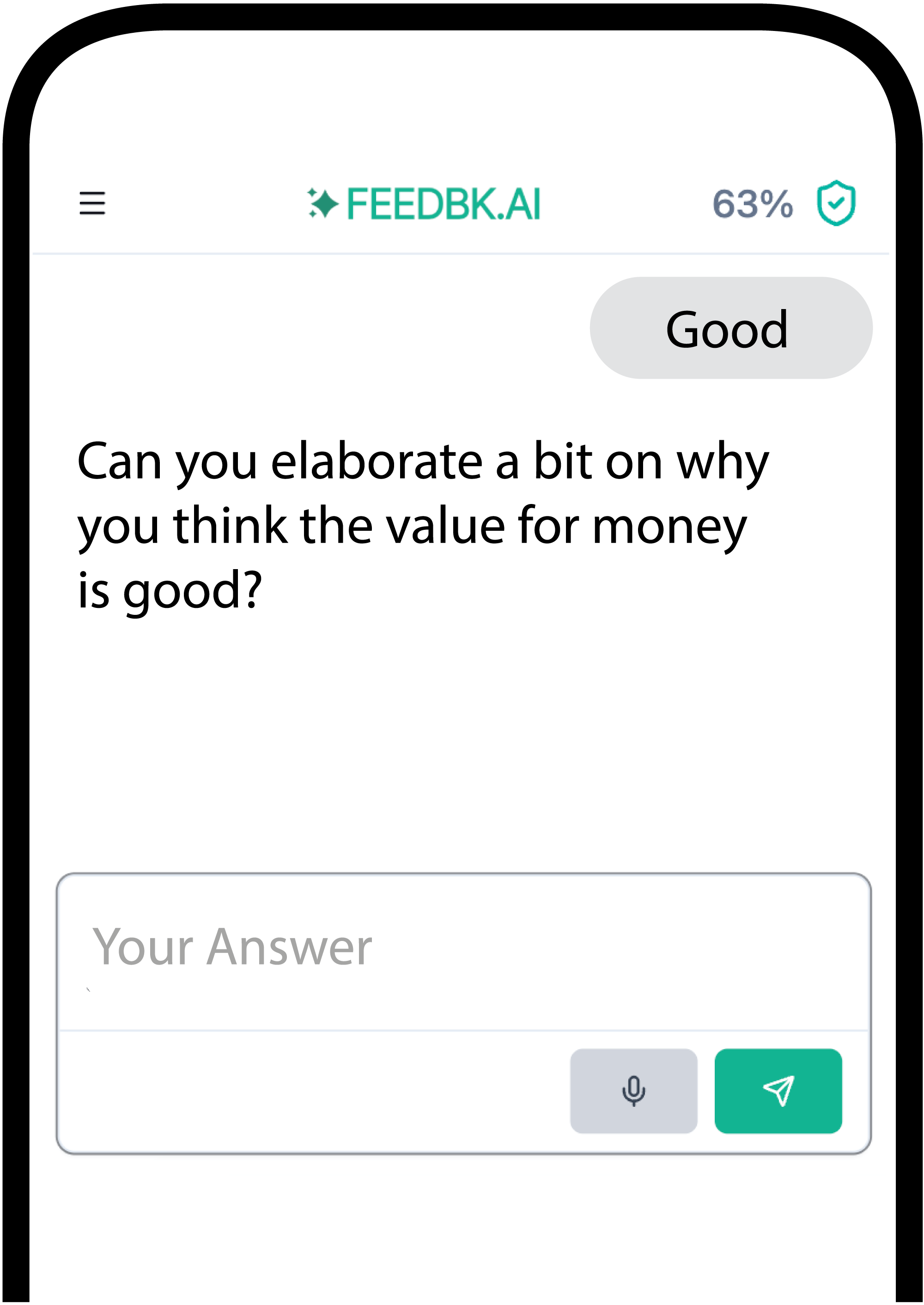
The key difference between a static survey (Method 1) and an AI-powered survey (Method 2) is called AI Probing: The survey itself thinks along and automatically asks follow-up questions when answers are vague or particularly interesting – like a human interviewer, but scalable.
Example:
- Question: “How satisfied are you with our service?”
- Answer: “It’s okay”
- AI follow-up: “What specifically could we improve to increase your satisfaction?”
The result: 2-3x more actionable feedback than static forms, without additional effort in creation.
Static Survey vs. AI-Powered Survey
| Static Survey (Method 1) | AI-Powered Survey (Method 2) | |
|---|---|---|
| Creation | ChatGPT formulates, you copy | ChatGPT creates and publishes |
| Execution | Fixed questions, no reaction | AI asks follow-ups for vague answers |
| Response quality | Often superficial (“Good”, “OK”) | Deeper insights through follow-ups |
| Analysis | Manual or Excel | AI-powered topic analysis |
| Effort | High (copying, formatting, analyzing) | Minimal (end-to-end in ChatGPT) |
Practical Examples: Prompts for Different Use Cases
Customer Feedback
Create a survey for customer feedback after purchase.
Product: SaaS software for project management.
Focus: Onboarding experience, feature usage, support quality.
8 questions, including 2 open ones for qualitative feedback.
Enable AI follow-ups for low ratings.
Employee Survey
See also: Employee Surveys with AI – Best practices for HR teams.
Create an anonymous employee survey about job satisfaction.
Topics: Work-life balance, leadership, development opportunities.
10 questions with 5-point scale plus comment field.
Ensure neutral, non-suggestive formulations.
Thesis / Research
Create a questionnaire for my bachelor thesis.
Topic: Use of AI tools in daily work.
Target audience: Working professionals in Germany, 25-45 years.
I need demographic questions, Likert scales,
and open questions for qualitative analysis.
Event Feedback
Create a short feedback survey for a conference.
Maximum 5 questions, quick to complete.
Focus: Overall impression, best session, improvement suggestions.
Common Mistakes to Avoid
1. Too Vague Prompts
❌ “Create a survey”
✅ “Create a survey with 8 questions about customer satisfaction for an online shop. Focus on delivery time, product quality, and return process.”
2. Not Checking for Suggestive Questions
ChatGPT can sometimes generate suggestive formulations. Always ask for a bias check:
Check all questions for neutrality.
Mark suggestive formulations and suggest alternatives.
3. Too Many Questions
Shorter surveys have higher completion rates. For most use cases, 5-10 questions are sufficient. More than 15 questions often lead to drop-offs.
4. Only Closed Questions
A mix of rating scales and open questions provides both quantitative data and qualitative insights. Plan for at least 1-2 open questions.
ChatGPT vs. Claude: Which AI for Surveys?
Both AI assistants support direct survey creation via MCP. The differences:
| Aspect | ChatGPT | Claude |
|---|---|---|
| Availability | Web, Desktop, Mobile | Web, Desktop |
| MCP Support | Yes (since 2025) | Yes (native) |
| Strength | Broad general knowledge | Precise formulations |
| Integration | OpenAI Ecosystem | Anthropic Ecosystem |
For pure survey creation, both deliver comparable results. The choice usually depends on which assistant you already use.
Claude setup:
# Claude Desktop: Settings → Connectors → Add Custom Connector
# Name: Feedbk Survey
# URL: https://mcp.feedbk.ai/mcp
Conclusion: Double AI Advantage
ChatGPT has fundamentally changed survey creation. What used to take hours now takes minutes. But the real breakthrough lies elsewhere: You’re not just creating with AI – you’re creating a survey that works with AI itself.
The two approaches compared:
Manual method: ChatGPT formulates questions, you copy them into a static tool. Faster than without AI, but the result remains a classic survey.
Integrated method: ChatGPT creates an AI-powered survey via MCP that automatically asks follow-up questions during the survey and intelligently analyzes results. Double AI advantage: AI in creation and AI in execution.
For one-time, quick drafts, the manual method is sufficient. For recurring surveys (customer feedback, event evaluations, employee surveys) with higher response quality, the one-time MCP setup is worth it.
Further Reading
- AI-Moderated Surveys via MCP – Detailed MCP setup guide for Claude & ChatGPT
- Why AI Probing Delivers 5x More Insights – How intelligent follow-ups work
- Alchemer vs Qualtrics vs SurveyMonkey 2026 – Which survey tools have AI probing?
- Top 5 AI Interview Tools 2026 – Compare leading AI interview platforms
- Conversational Surveys: The Complete Guide – Why chat-based surveys perform better
Try It Now
Want to test AI-moderated surveys?